 Minibox
VS Code 不小心隱藏 VS Code 右上角 "執行" 按鈕,如何恢復?
2025-04-05
不小心隱藏 VS Code 右上角執行按鈕,如何恢復?
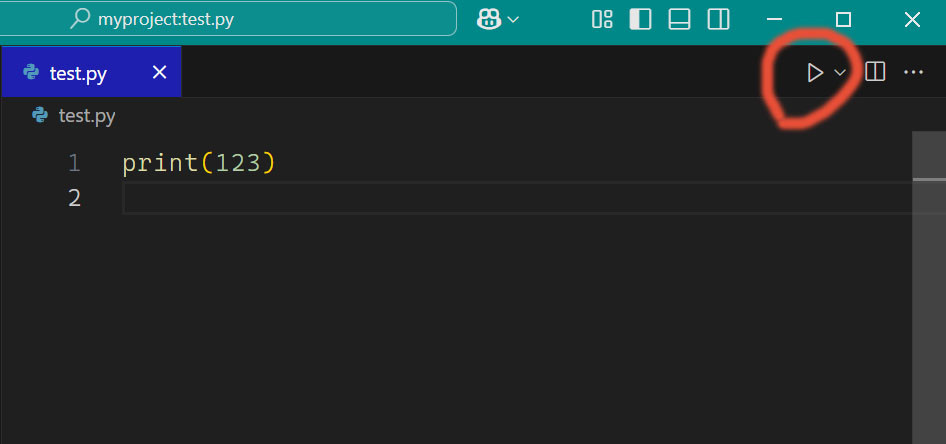
按 F1 or Ctrl+Shift+P
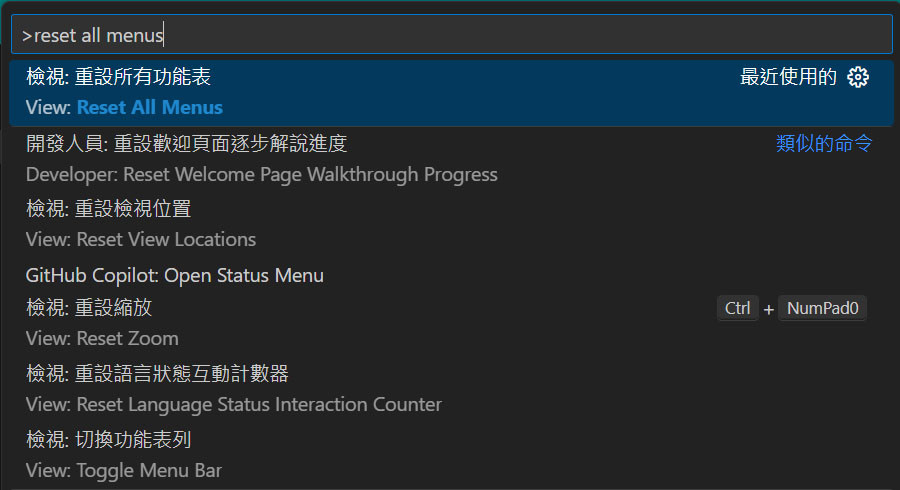
搜尋 "reset all menus"
再按下去,即可恢復
Windows 11 檔案總管 右鍵無 "Open with VS Code"
儲存為 a.reg 在桌面
再點兩下執行、匯入即可
Windows Registry Editor Version 5.00

[HKEY_CLASSES_ROOT\*\shell\Open with VS Code]
@="Edit with VS Code"
"Icon"=""c:\\Users\\hello\\AppData\\Local\\Programs\\Microsoft VS Code\\Code.exe,0"

[HKEY_CLASSES_ROOT\*\shell\Open with VS Code\command]
@="\""c:\\Users\\hello\\AppData\\Local\\Programs\\Microsoft VS Code\\Code.exe\" \"%1\""

[HKEY_CLASSES_ROOT\Directory\shell\vscode]
@="Open Folder as VS Code Project"
"Icon"="\"c:\\Users\\hello\\AppData\\Local\\Programs\\Microsoft VS Code\\Code.exe\",0"

[HKEY_CLASSES_ROOT\Directory\shell\vscode\command]
@="\"c:\\Users\\hello\\AppData\\Local\\Programs\\Microsoft VS Code\\Code.exe\" \"%1\""

[HKEY_CLASSES_ROOT\Directory\Background\shell\vscode]
@="Open Folder as VS Code Project"
"Icon"="\"c:\\Users\\hello\\AppData\\Local\\Programs\\Microsoft VS Code\\Code.exe\",0"

[HKEY_CLASSES_ROOT\Directory\Background\shell\vscode\command]
@="\"c:\\Users\\hello\\AppData\\Local\\Programs\\Microsoft VS Code\\Code.exe\" \"%V\""
分類:軟體
232
留言
相關文章