 Minibox
MooseFS 4 管理筆記、常用工具程式
2025-01-20
所有工具程式 都放在
/usr/bin/
mount
$ mfsmount -H 192.168.0.211 /mnt/mfs
或
$ mfsmount -H mfsmaster /mnt/mfs
或
$ mount -t moosefs mfsmaster: /mnt/mfs


unmount
mfsmount -u /mnt/mfs
mfsgetsclass
查詢目錄或檔案的副本數量
子目錄、檔案都自動繼承上層目錄相同的值
3.0舊版的程式名稱是:mfsgetgoal
$ mfsgetsclass /mnt/folder1
/mnt/folder1: 2
查 /data/test 的副本數


$ mfsgetsclass /mnt/folder1/3.jpg
/mnt/folder1/3.jpg: 2
查 3.jpg 副本數


$ mfsgetsclass /mnt/mfs/*
/mnt/mfs/tmp: 3
/mnt/mfs/zoo: 2


$ mfsgetsclass -r /mnt/mfs/*
/mnt/mfs/tmp:
       files with storage class : 3 :
                          count :      47843
 directories with storage class : 3 :
                          count :       5140
/mnt/mfs/zoo:
       files with storage class : 3 :
                          count :          4
 directories with storage class : 2 :
                          count :          1
mfssetsclass
設定目錄或檔案的副本數量
3.0舊版的程式名稱是:mfssetgoal
$ mfssetsclass 3 /mnt/mfs/3.jpg
將 /mnt/mfs/3.jpg 設為3個副本 (也就是備份於三台不同的 chunkserver)

$ mfssetsclass 3 /mnt/mfs/folde1
將 /mnt/mfs/folde1 設定3個副本
特別注意:folder1目錄內的舊檔案或舊目錄不會改為 3副本,仍套用內定值的2副本


$ mfssetsclass -r 3 /mnt/mfs
-r 以遞迴方式,將 /mnt/mfs 內所有的檔案與目錄,都設定為 3副本
mfsdirinfo
查詢目錄的狀態
$ mfsdirinfo /mnt/mfs
/mnt/mfs:
 inodes:                      52984
  directories:                 5141
  files:                      47843
 chunks:                      47834
 length:                  402840010
 size:                   3747299328
 realsize:              11241897984

$ mfsdirinfo -H /mnt/mfs/tmp
/mnt/mfs/tmp:
 inodes:         439
  directories:   166
  files:         273
 chunks:         277
 length:       427MB
 size:         445MB
 realsize:     1.3GB

$ mfsdirinfo -h /mnt/mfs/tmp
/mnt/mfs/tmp:
 inodes:          439
  directories:    166
  files:          273
 chunks:          277
 length:       407MiB
 size:         424MiB
 realsize:     1.2GiB

-H、-h 參數的不同:
-H 以1000為進位單位,表示方式: MB、GB
-h 以1024為進位單位,表示方式: MiB、GiB
mfsfileinfo
查詢檔案的狀態
$ mfscheckfile  index.php   #10KB檔案
index.php:
3 full copies (redundancy level: 2):          1
3個副本,冗餘等級2,1個切片


$ mfscheckfile psd.zip   #64MB檔案
psd.zip:
3 full copies (redundancy level: 2):          2
3個副本,冗餘等級2,2個切片
mfscheckfile
查詢檔案切片數量、儲存分佈
$ mfsfileinfo index.php
index.php:
        chunk 0: 000000000000B39D_00000001 / (id:45981 ver:1) ; mtime:1737285810 (2025-01-19 19:23:30)
                copy 1: 192.168.0.202:9422 ; status:VALID
                copy 2: 192.168.0.203:9422 ; status:VALID
                copy 3: 192.168.0.213:9422 ; status:VALID


對於較大的檔案(約>64MB),在 chunkserver 儲存時會切成多份:

$ mfsfileinfo psd.zip    #這個檔案 64MB, 被切成2份
psd.zip:
        chunk 0: 000000000000BAF1_00000001 / (id:47857 ver:1) ; mtime:1737365834 (2025-01-20 17:37:14)
                copy 1: 192.168.0.202:9422 ; status:VALID
                copy 2: 192.168.0.203:9422 ; status:VALID
                copy 3: 192.168.0.213:9422 ; status:VALID
        chunk 1: 000000000000BAF2_00000001 / (id:47858 ver:1) ; mtime:1737365834 (2025-01-20 17:37:14)
                copy 1: 192.168.0.202:9422 ; status:VALID
                copy 2: 192.168.0.203:9422 ; status:VALID
                copy 3: 192.168.0.213:9422 ; status:VALID


$ mfsfileinfo psd2.tgz  #這個檔案 340MB, 被切成6份
psd2.tgz:
        chunk 0: 000000000000BAF3_00000001 / (id:47859 ver:1) ; mtime:1737366116 (2025-01-20 17:41:56)
                copy 1: 192.168.0.202:9422 ; status:VALID
                copy 2: 192.168.0.203:9422 ; status:VALID
                copy 3: 192.168.0.213:9422 ; status:VALID
        chunk 1: 000000000000BAF4_00000001 / (id:47860 ver:1) ; mtime:1737366118 (2025-01-20 17:41:58)
                copy 1: 192.168.0.202:9422 ; status:VALID
                copy 2: 192.168.0.203:9422 ; status:VALID
                copy 3: 192.168.0.213:9422 ; status:VALID
        chunk 2: 000000000000BAF5_00000001 / (id:47861 ver:1) ; mtime:1737366120 (2025-01-20 17:42:00)
                copy 1: 192.168.0.202:9422 ; status:VALID
                copy 2: 192.168.0.203:9422 ; status:VALID
                copy 3: 192.168.0.213:9422 ; status:VALID
        chunk 3: 000000000000BAF6_00000001 / (id:47862 ver:1) ; mtime:1737366124 (2025-01-20 17:42:04)
                copy 1: 192.168.0.202:9422 ; status:VALID
                copy 2: 192.168.0.203:9422 ; status:VALID
                copy 3: 192.168.0.213:9422 ; status:VALID
        chunk 4: 000000000000BAF7_00000001 / (id:47863 ver:1) ; mtime:1737366130 (2025-01-20 17:42:10)
                copy 1: 192.168.0.202:9422 ; status:VALID
                copy 2: 192.168.0.203:9422 ; status:VALID
                copy 3: 192.168.0.213:9422 ; status:VALID
        chunk 5: 000000000000BAF8_00000001 / (id:47864 ver:1) ; mtime:1737366131 (2025-01-20 17:42:11)
                copy 1: 192.168.0.202:9422 ; status:VALID
                copy 2: 192.168.0.203:9422 ; status:VALID
                copy 3: 192.168.0.213:9422 ; status:VALID
刪除檔案
-
刪除 MooseFS 檔案時,系統並不會馬上自硬碟刪除;檔案會暫存在垃圾桶中,過了保留時間 (內定暫存 24小時) 才會被完整刪除。
-
垃圾箱的保留時間可手動調整清空垃圾箱(以釋放空間)。參考指南中的「MooseFS 特定操作」部分有更多詳細資訊。
-
當 刪除檔案 (少量或大量數千檔案) 後,在監控畫面(mfs.cgi) 不會馬上看到 pending deletion 數字的變化。 約 24小時(內定值) 後 pending deletion才會出現數字,接著 系統會陸續真正刪除這些檔案
$ mkdir /mnt/mfsmeta
$ mfsmount -m /mnt/mfsmeta

$ ls -l /mnt/mfsmeta
total 0
dr-x------    2 root root 0 Jan 20 09:48 sustained
drwx------ 4099 root root 0 Jan 20 09:48 trash

裏頭的檔案結構像:
$ ls /mnt/mfsmeta/trash/000
'00001000|tmp|www.abc.com.tw|html|readme.txt'
'00002000|tmp|www.abc.com.tw|html|test.html'
'00003000|tmp|www.abc.com.tw|html|test2.html'
'00004000|tmp|www.abc.com.tw|html|test3.html'
'00007000|tmp|www.abc.com.tw|views|mobile|view1.php'
'00008000|tmp|www.abc.com.tw|views|mobile||block.php
'00009000|tmp|www.abc.com.tw|views|frame.php'
 undel
救回已刪除的檔案
#1 找出被刪除的檔案 放在垃圾桶中的目錄位置

$ find /mnt/mfsmeta -name *config.js   檔名最前面要加 *
/mnt/mfsmeta/trash/B06/00004B06|public|js|my_ckeditor_config.js
/mnt/mfsmeta/trash/AA3/00004B20|public|ckeditor|config.js   確定要救回這個檔案
/mnt/mfsmeta/trash/B22/00004B22|public|ckeditor|build-config.js

#2 救回檔案
只要將檔案移到 /mnt/mfsmeta/trash/undel 目錄即可
注意:救檔案 **並不是將檔案 複製到作業系統中的其它目錄**

$ mv /mnt/mfsmeta/trash/AA3/00004B20|public|ckeditor|config.js /mnt/mfsmeta/trash/undel/
查詢檔案的垃圾桶保留時間
$ mfsgettrashretention index.php
index.php: 24 (1d)   內定值都是 24小時
設定檔案的垃圾桶保留時間
$ mfssettrashretention 1d index.php
index.php: 24 (1d)

$ mfssettrashretention 1w index.php
index.php: 168 (1w)

$ mfssettrashretention 1h index.php
index.php: 1 (1h)


遞迴 設定整個目錄
$ mfssettrashretention -r 1h views
views:
 inodes with trash retention changed:             37
 inodes with trash retention not changed:          0
 inodes with permission denied:                    0
針對垃圾桶內的檔案
查詢已刪除的檔案:
$ mfsgettrashretention /mnt/mfsmeta/trash/FFF/*
/mnt/mfsmeta/trash/FFF/00000FFF|tmp|aa.html: 24 (1d)
/mnt/mfsmeta/trash/FFF/00001FFF|tmp|test.js: 24 (1d)
/mnt/mfsmeta/trash/FFF/00002FFF|tmp|test.css: 24 (1d)
/mnt/mfsmeta/trash/FFF/00003FFF|tmp|folde|00.html: 24 (1)
/mnt/mfsmeta/trash/FFF/undel: No such file or directory
針對已刪除的檔案,修改時間,讓 MooseFS 盡快(或慢點) 刪除檔案
$ mfssettrashretention 1h /mnt/mfsmeta/trash/FFF/*
/mnt/mfsmeta/trash/FFF/00000FFF|tmp|aa.html: 1 (1h)
/mnt/mfsmeta/trash/FFF/00001FFF|tmp|test.js: 1 (1h)
/mnt/mfsmeta/trash/FFF/00002FFF|tmp|test.css: 1 (1h)
/mnt/mfsmeta/trash/FFF/00003FFF|tmp|folde|00.htm: 1 (1h)
FFF/undel: No such file or directory
*直接刪除 /mnt/mfsmeta/trash/XXX 裏頭的檔案名稱,也可讓 MooseFS 立即自各 chunkserver 中刪除檔案。
無法下這樣的命令
$ mfssettrashretention 1h /mnt/mfsmeta/trash/119/
或
$ mfssettrashretention 1h /mnt/mfsmeta/trash/*
或
$ mfssettrashretention -r 1h /mnt/mfsmeta/trash/*FAQ
-
新增 chunkserver 後 ,系統馬上就會做 chunkdata平衡
-
chunkserver中新增(或移除)硬碟 ,系統馬上就會做 chunkdata平衡
-
增刪硬碟、chunkserver 後,內部重新平衡 (Internal Rebalance)
- v3.0版:平衡的目標是 讓每個硬碟的使用率盡可能相同
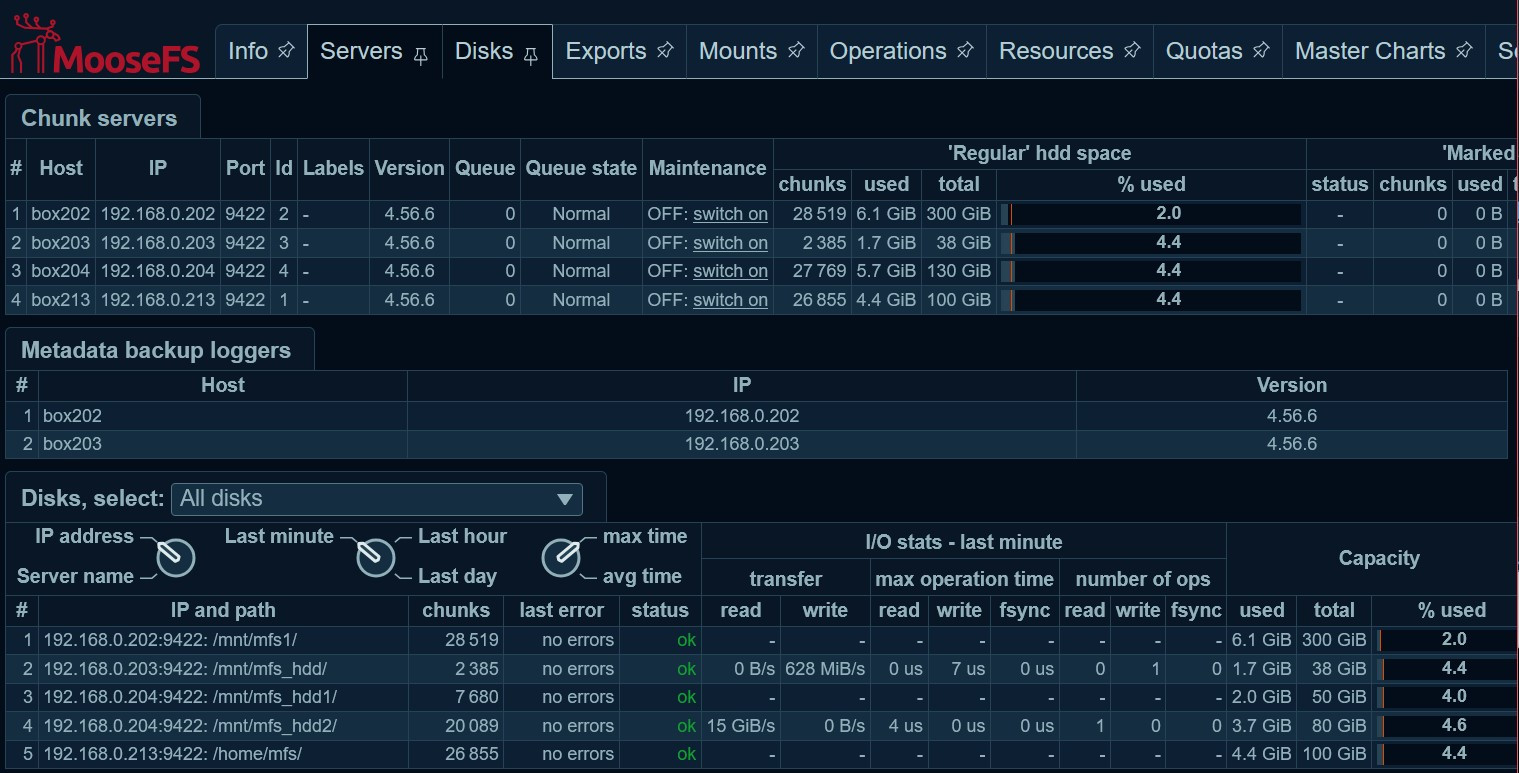
- 總共儲存 10GB 檔案
- 192.168.0.202 這台 使用率低2% 低於其它chunkserver ?!
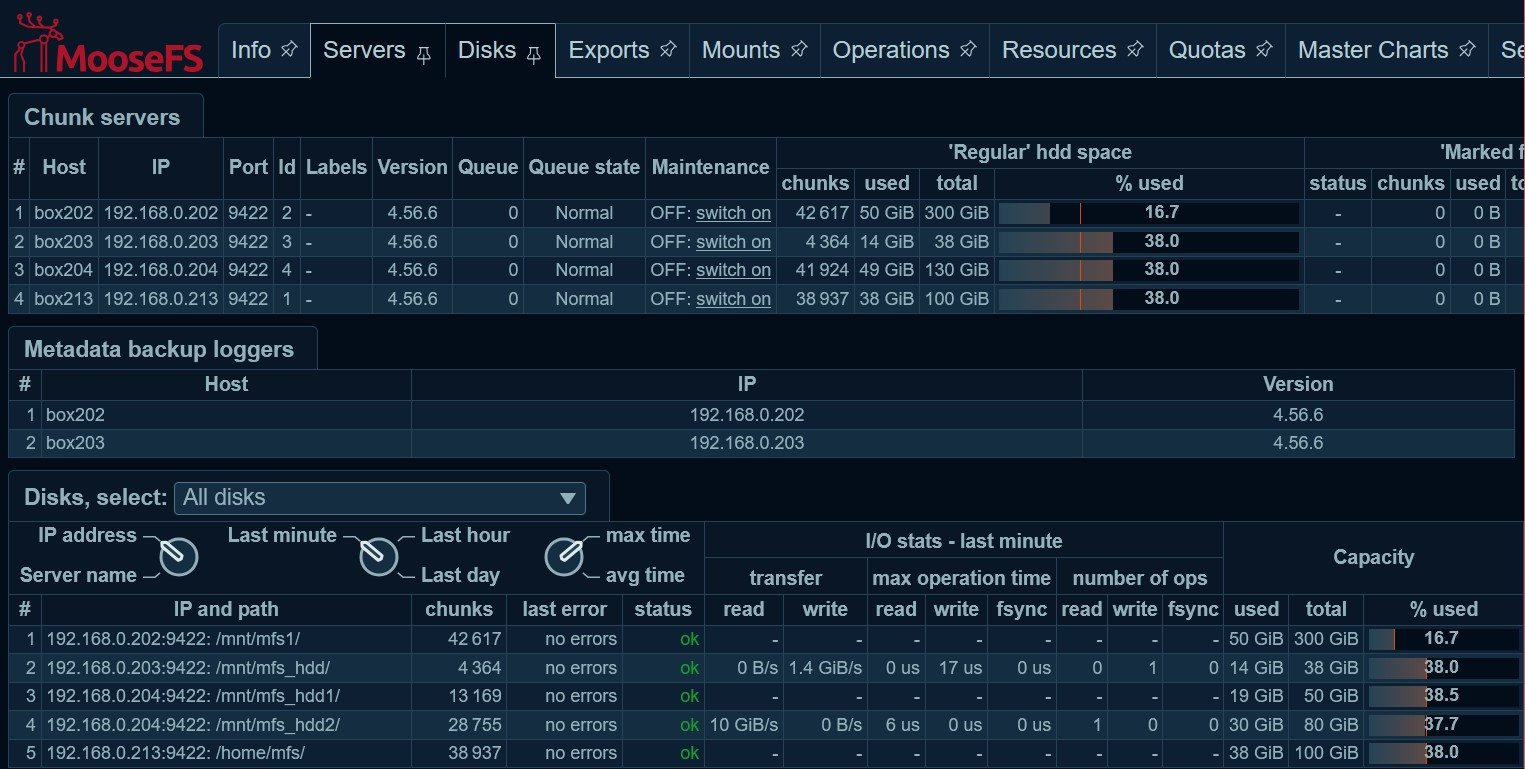
- 總共儲存 57GB 檔案
- 192.168.0.202 這台 使用率仍低於其它chunkserver ?!
參考:
留言
相關文章